
GoDocs has expanded the C&I loan platform to include new Cross‑Default and Cross‑Collateralization options—features previously available only in CRE loans. These settings allow lenders to define how a borrower’s obligations under one loan relate to their obligations under other loans.
This enhancement is part of the ongoing build‑out of the C&I product line and was requested by multiple customers.
Where to Access the New Settings
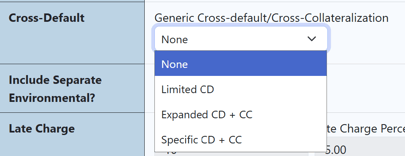
When enabled, a new dropdown appears on the Loan Details page for any C&I loan:
Available Options
The dropdown includes four choices. These options determine how the system will generate the legal language in your loan documents.
1. None
Selecting None removes all cross‑default and cross‑collateralization provisions.
Document behavior:
- No cross‑default language
- No cross‑collateralization language
2. Limited CD
Selecting Limited CD adds standard, limited cross‑default language.
Document behavior:
- Cross-default language is included
- No cross‑collateralization language
3. Expanded CD + CC
Selecting Expanded CD + CC inserts broader cross‑default and cross‑collateralization provisions.
Document behavior:
- Expanded definitions of related loans
- Cross‑collateralization across the lender’s loan relationship
- Additional enforcement rights
4. Specific CD + CC
Selecting Specific CD + CC allows the user to specify exactly which loans are cross‑defaulted and/or cross‑collateralized.
Document behavior:
- A schedule of selected loans is added
- Cross‑default language references only those loans
- Cross‑collateralization language references only those loans
When the user selects Specific CD + CC, an additional question appears:
“Cross‑Collateralize with other loan(s)?”
Default: No
If the user selects Yes, the user can add one or more specific loans.
Click Add New to enter the details.
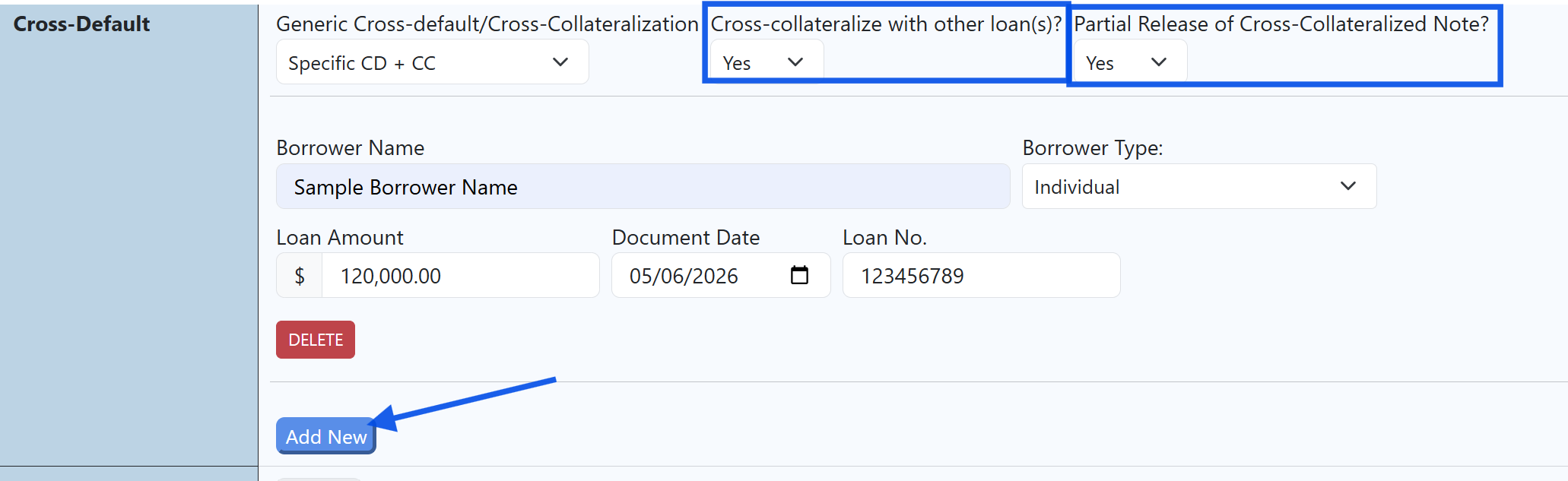
Then the system inserts:
- Partial release provisions
- Release conditions
- Release procedures