.png?width=225&height=60&name=225x60%20Logo%20(1).png)
How to Create a Participation Agreement in GoDocs (CRE & C&I Loans)
Overview
GoDocs supports the creation of Participation Agreements within both Commercial Real Estate (CRE) and Commercial & Industrial (C&I) loan documentation workflows.
A Participation Agreement allows a lender (the Lead Lender) to sell a participation interest in a loan to one or more other lenders (the Participants), while the Lead Lender remains the sole owner and administrator of the loan with the borrower.
This feature enables lenders to:
- Share loan income with participating institutions
- Retain full control of borrower communications and enforcement
- Optimize balance sheet capacity by booking only their retained interest
Important: Participation interests are not disclosed to the borrower and do not affect the borrower‑facing loan documents.
When to Use a Participation Agreement
You should include a Participation Agreement when:
- You are originating a CRE or C&I loan as the Lead Lender, and
- You intend to sell a participation interest (for example, 25% or 50%) to one or more external lenders.
Participation Agreements are commonly used for:
- Larger CRE or C&I credit facilities
- Relationship lending with correspondent banks or credit unions
- Situations where the Lead Lender retains servicing and control
If no participation is being sold, this document is not required.
Step‑by‑Step: How to Create a Participation Agreement
Step 1: Start a CRE or C&I Loan in GoDocs
Begin by creating your CRE or C&I loan as you normally would within the GoDocs platform.
Ensure all core loan terms (loan amount, interest structure, disbursements, etc.) are entered accurately before proceeding.
Step 2: Enable the Participation Agreement
Within the loan tab, navigate to the Participation Agreement section.
Select "Yes" in the drop-down under Participation Agreement.
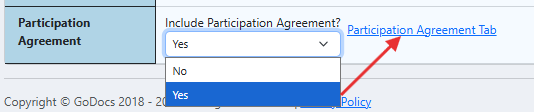
Once enabled, click the "Participation Agreement Tab" link.
Step 3: Enter Participation Details
Within the Participation Agreement Tab, provide the required participation information, including:
- Participant(s) (one or more)
- To add an additional Participant, click "Add Participant"
- Participation Percentage(s)
- Participation Amount(s)
-
Participant Address
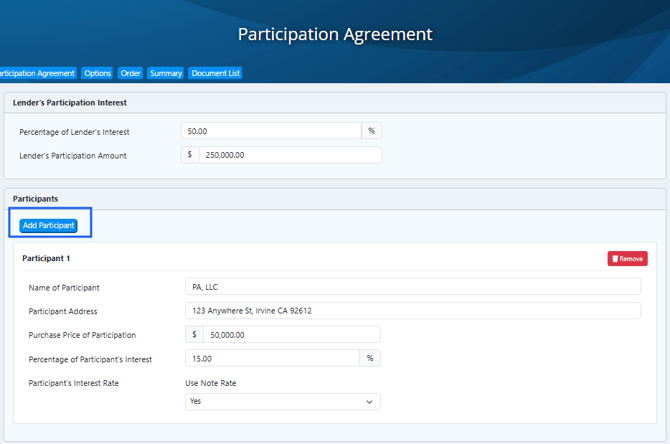
Step 4: Participant’s Interest Rate – “Use Note Rate” Dropdown
The Use Note Rate dropdown controls how the Participant’s Interest Rate is reflected in the Participation Agreement.
This setting determines whether the participant shares in the same interest rate as the borrower’s loan or whether a separate rate is applied for the participant.
Option1: Yes – Use Note Rate
When Use Note Rate = Yes is selected:

- The Participant’s Interest Rate automatically mirrors the Note Interest Rate from the Loan tab.
- All interest components are pulled directly from the loan setup, including:
- Fixed rate percentage, or
- Index (for ARM or Hybrid loans), and
- Applicable margin
- No additional rate fields are required for the participant.
Result in the documents:
The Participation Agreement reflects that the participant earns interest at the same rate and structure as the borrower’s loan.
✅ This option is typically used when the participant is sharing in the loan on identical pricing terms as the Lead Lender.
Option 2: No – Do Not Use Note Rate
When Use Note Rate = No is selected:
- The Participant’s Interest Rate is defined separately and does not automatically follow the borrower’s Note rate.
- Additional fields appear based on the loan’s interest structure.
If the Note Rate is Fixed:
- An open Fixed Rate Percentage field becomes available:
-
Enter the fixed interest rate that applies specifically to the participant.

If the Note Rate is ARM or Hybrid:
You will be prompted to define the participant’s rate using:
- The selected Index, plus
-
An adjustable Margin Percentage:
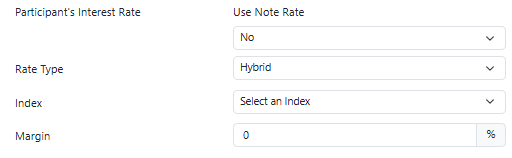
The Participation Agreement reflects a participant-specific interest rate that may differ from the borrower’s Note rate.
✅ This option is commonly used when participants receive different pricing than the Lead Lender.
Step 5: Disbursement & Interest Treatment (If Applicable)
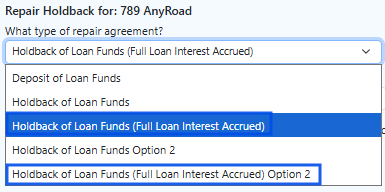
For loans that include a holdback of loan funds, GoDocs applies the appropriate interest calculation logic:
Non‑Dutch (Standard Holdback)
- Interest and/or P&I payments are calculated only on funds actually disbursed to the borrower.
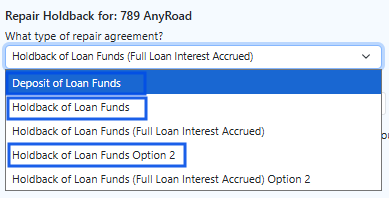
Dutch (Full Loan Interest Accrued)
- Interest is calculated based on the full note amount, even if a portion is held back.