.png?width=225&height=60&name=225x60%20Logo%20(1).png)
Page Preview- How It Works:
The Page Preview feature allows you to review the full, assembled document package before downloading or delivering it.
-
Create your order as you normally would.
-
Order Validation runs automatically, checking for required fields, jurisdictional logic, and overall data integrity.
-
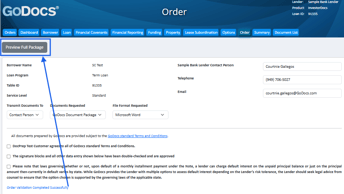
Once validation completes successfully, the Preview Full Package button appears on the order page.
-
-
Click Preview Full Package to open a watermarked, view‑only version of the complete document package.
-
Review the documents to confirm accuracy and completeness.
-
When finished, proceed to Ordering the package.
Preview Experience:
While viewing the package in Preview mode, the following safeguards and behaviors apply:
- Watermark: A visible diagonal watermark (for example, “Preview”) appears on every page to indicate this is not the final, downloadable version.
- Copy and Download Restrictions: Copy, paste, right‑click saving, printing, and direct downloads are disabled to protect sensitive information.
- Snapshot Behavior: The preview reflects the current validated version of the document package. If you update data or selections, you must re‑validate the order to generate an updated preview.
Page Count - How It Works:
The Page Count feature provides visibility into how many pages will be included in the final document package based on order data.
-
Create your order as usual.
-
Order Validation runs, applying required field checks, jurisdictional rules, and document logic.
-
After validation is complete, navigate to the Document List tab.
-
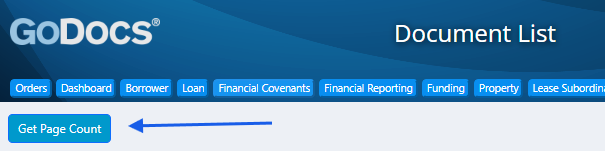
In the Document List tab, click the Get Page Count button located next to the list of documents included in the package based on your data entry.
-
The system calculates and displays the page count using the fully assembled document package.
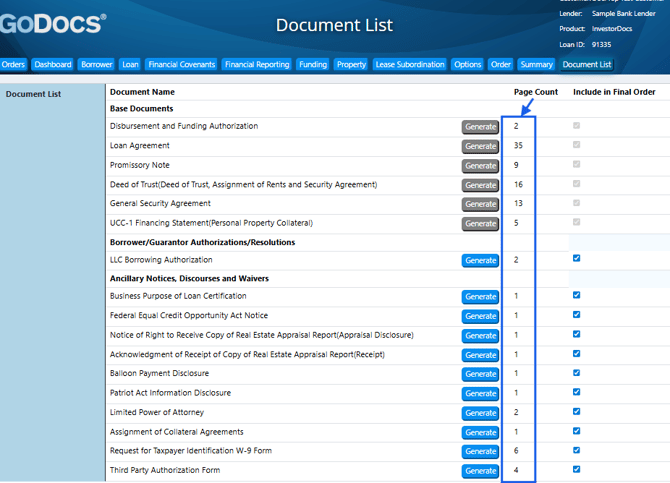
*Page counts may change if borrower data, property details, or document selections are updated. Re‑validate the order to refresh both the preview and page count.