.png?width=225&height=60&name=225x60%20Logo%20(1).png)
In your GoDocs package, this is governed by the separate document titled “Cash Collateral and Security Agreement. It is the borrower’s money held or controlled by the lender and used to reduce lender risk. It can be applied to the loan if certain conditions occur (default, low income, failure to meet covenants, etc.)
On the Loan tab please select yes to turn on the Holdback Page:

Once on the Holdback Page you can select from four Deadline Date Options:
1) Deadline Date
2) Deadline: Number of days after loan funding
3) Earliest Release Date, and
4) Hold for entire term of the loan.
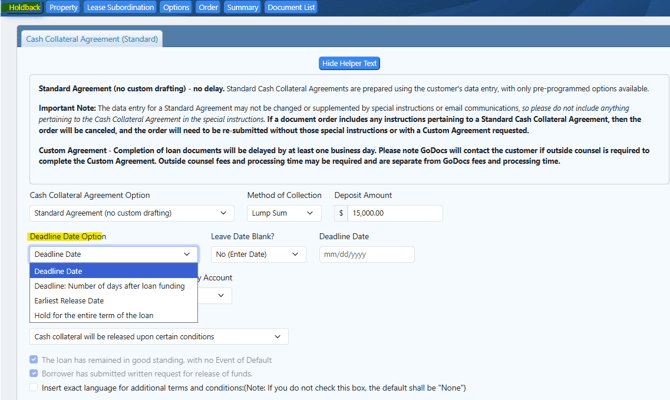
For option 1) Deadline Date you can select with or without a deadline date:

The difference between entering a deadline date and leaving it blank, is only in the Exhibit A of the CCA:

For option 2) Deadline: Number of days after loan funding you can enter the number of days after loan funding:
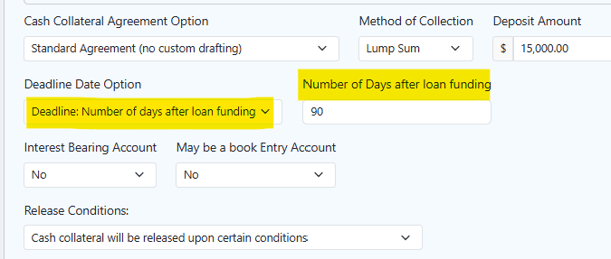
That deadline option will be reflected in Exhibit A of the CCA:
For option 3) Earliest Release Date you can select to leave the deadline date blank or enter a value:

The difference between leaving the earliest release date blank or entering a value:

The difference between selecting a Deadline Date with a set date or selecting the deadline date with the Earlist Release Date is both in the body of the CCA as well as in Exhibit A:


For option 4) Hold for entire term of the loan the referrence is within the body of the CCA and there is no exhibit A:

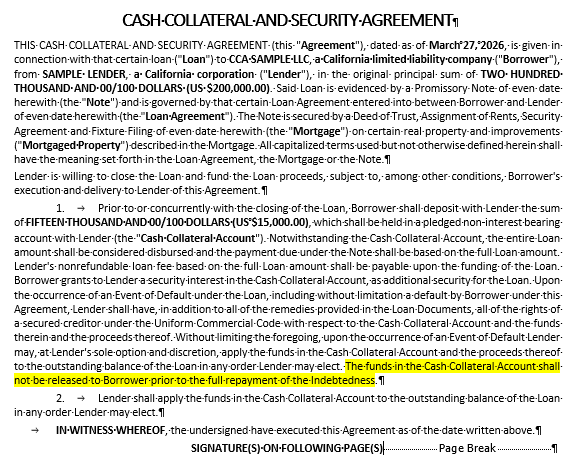
Difference between Option 4 of "Hold for the entire term of the loan" and any of the other options 1 through 3 is in the body of the CCA as well as the Exhibit A:


Lastly, all four options allow for the selection of an Interest Bearing Account and/or making it a Book Entry Account only:

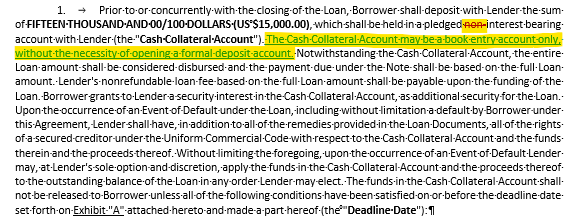
For Options 1, 2 and 3 that generate an Exhibit A, you can check the box to "Insert exact language for additional terms and conditions:"
