.png?width=225&height=60&name=225x60%20Logo%20(1).png)
Description
A typical ground lease is a land lease agreement wherein the lessee or tenant pays rent on a parcel of land and can build and modify the property there. After the lease term is up, the leased land, all new property built on it, and any additions to that current property transfer in ownership to the landlord or lessor.
The Assignment of Rents and Leases provisions absolutely and unconditionally assign to Lender all of the Borrower's right, title, and interest in and to all Leases and all Rents — which includes ground rent payments from a ground lease tenant — as well as Borrower's rights to modify, extend, or terminate any such lease (subject to Lender's approval).
The lease covenants in the Deed of Trust govern all Leases under the Mortgage, requiring among other things that all leases be subordinate to the Mortgage, that tenants attorn to Lender, and that Lender's prior written approval be obtained for new leases, modifications, and terminations — all of which apply equally to a ground lease.
"Rents" is also broadly defined to include all rents, revenues, and other income of the Land or the Improvements — capturing ground rent just as it would any other rental income stream.
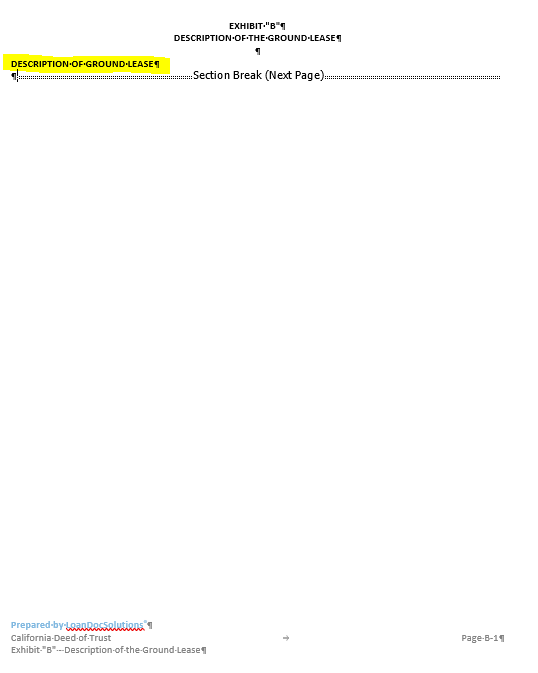
1. Collateral descriptions. Everywhere the documents said "fee simple title," they now say the borrower's "leasehold estate" — the security instrument, granting clauses, and exhibits all now describe the lease interest as the collateral, and a new Exhibit B is added describing the ground lease itself (parties, date, recording info).
2. A new required payment. Ground rent is now treated like property taxes and insurance: it must be paid on time, it can be escrowed with the other impounds, and the lender can pay it from escrow to keep the lease current.
3. Protecting the lease — because the lease is the collateral. Understanding if the lease ends, the collateral ends with it. So the borrower makes additional statements that the lease is valid and in good standing, and agrees to keep it that way: pay the rent, comply with lease terms, forward any notices from the ground lessor within 10 days, and never terminate, amend, surrender, or subordinate the lease without lender consent.
4. The mortgage doubles as an assignment of the lease. You won't see a separate "Assignment of Land Lease" document in the package because the security instrument performs that job directly. The defined "Leasehold Estate" being mortgaged sweeps in everything the lessee has — the lease, all renewal and extension rights, deposits with the ground lessor, and every other right under the lease — and the borrower also absolutely assigns to the lender its rights to terminate, surrender, or modify the lease, so any attempt to do so without lender consent is legally void. On a default and foreclosure, the lender (or the foreclosure buyer) succeeds to the lease through the mortgage, just as it would under a standalone assignment.
5. Lender safety nets for taking over. The lender gets tools to keep the lease alive and, if necessary, step into it: the right to cure a lease default itself (including paying rent and entering the property), the right to exercise renewal options the borrower ignores, an irrevocable power of attorney to act in the borrower's name under the lease, bankruptcy protections that can require the lease to be assumed and assigned to the lender, a right to a replacement lease directly from the ground lessor if the original is terminated, and a "no merger" rule so that if the borrower later buys the land, the mortgage automatically spreads to cover full ownership.
User Interface
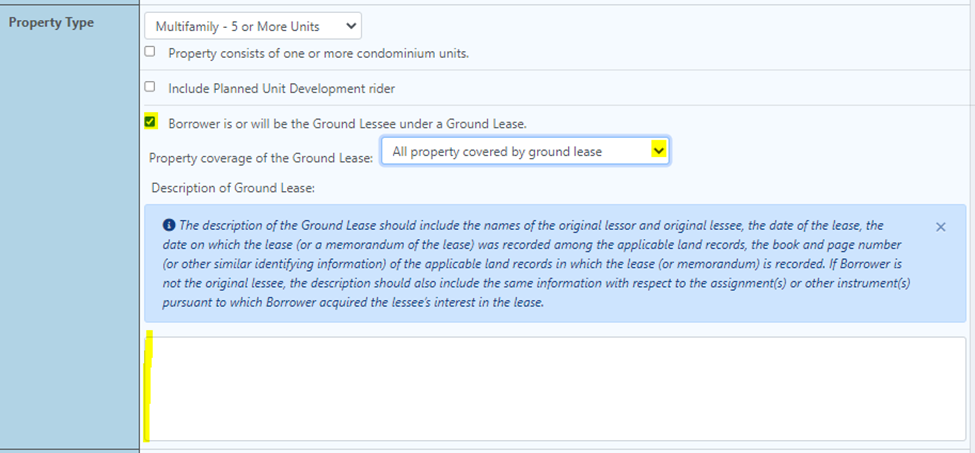
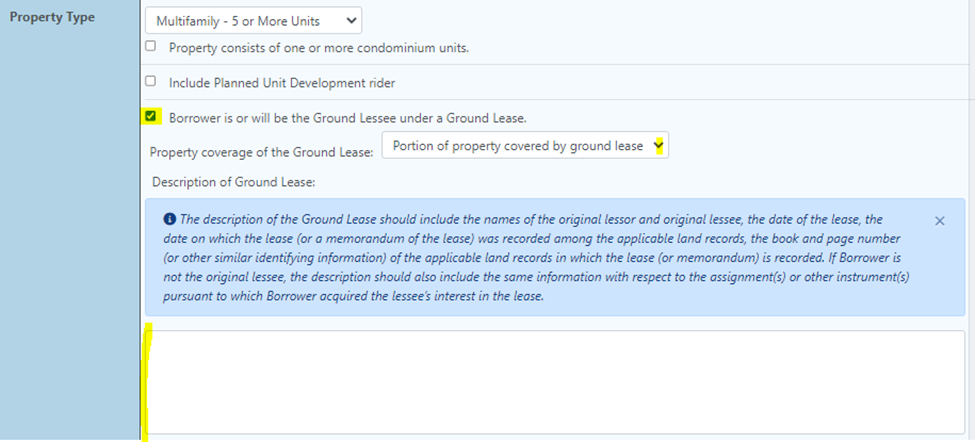
Navigate to the "Property Tab" and scroll down to the "Property Type" section.
Select the check box that says "Borrower is or will be the Ground Lessee under a Ground Lease"
Then select the appropriate option for ground lease coverage, and use the instructions below in blue to complete the description of the ground lease
(a) All property covered by ground lease
(b) Portion of property covered by ground lease
GoDocs Software Output Sample
The description of the Ground Lease input in the Order will appear on the following Exhibit